
Two Versions at Once
An agent hands you a pull request titled "Store prices in cents." Forty files changed. The tests pass. Buried in the diff is one migration:
ALTER TABLE products ADD COLUMN price_cents integer;
UPDATE products SET price_cents = round(price * 100);
ALTER TABLE products ALTER COLUMN price_cents SET NOT NULL;
ALTER TABLE products DROP COLUMN price;The application code now reads and writes price_cents everywhere. The agent also renamed ProductRepo to ProductStore while it was in there, moved six files, and changed how discounts round. On your laptop, with an empty database and one copy of the app, all of it works.
In production this change will break checkout for a few minutes, may freeze the products table while it runs, and cannot be undone by rolling back. None of that shows up in the tests, because the tests run one version of the code against a database that was created from scratch. Production runs two versions of the code against one database that already holds your data.
Old code and new code share one database
A deploy takes time. Suppose you run 20 app instances and your platform replaces them four at a time, waiting for each new batch to pass a health check before moving on. That is five batches, and if each takes a minute, then for about five minutes some requests are served by the old code and some by the new. This is a rolling deploy, and nearly every deployment method has a window like it.
The database has no such window. A migration changes the schema at one instant, for every instance at once.
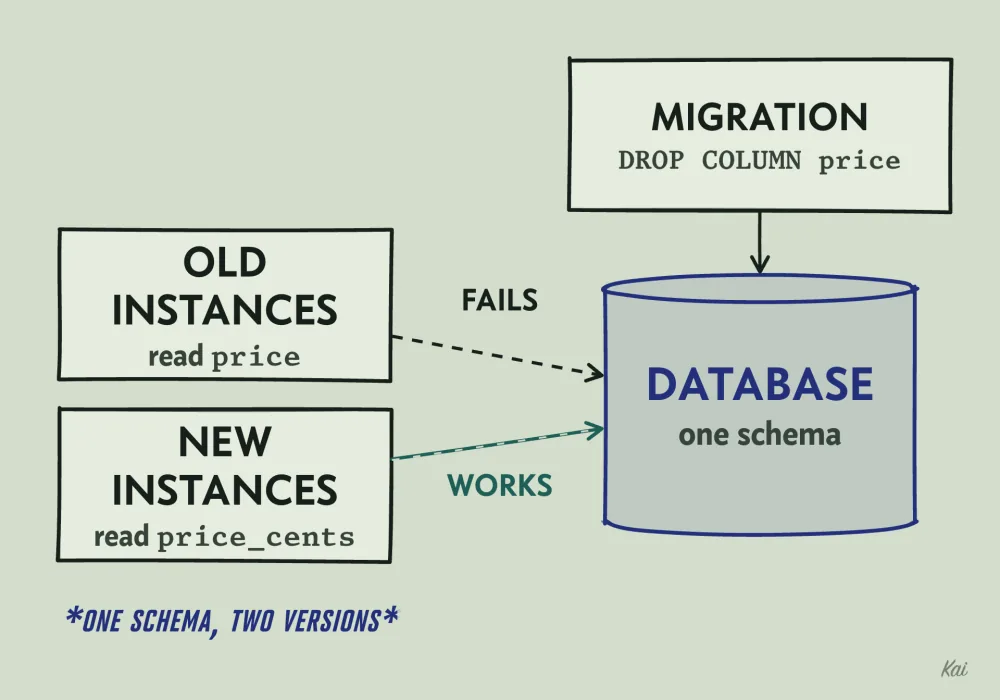
price first, every request an old instance serves fails until that instance is replaced.If the migration runs before the rollout, then when DROP COLUMN price commits, the 20 old instances are still running queries like SELECT id, name, price FROM products. Postgres answers each one with column "price" does not exist.
Every product page and every checkout served by an old instance fails until that instance is replaced. Even without the drop there would be a second break: old instances inserting a new product do not know about price_cents, so their inserts leave it null and violate the NOT NULL constraint.
If the migration runs after the rollout instead, the new instances start first and query price_cents, which does not exist yet. Either order breaks something. This model counts failed requests in each minute of the rollout, for both orders and for a schema that has both columns:
const INSTANCES = 20;
const BATCH = 4; // instances replaced per minute
const REQUESTS_PER_INSTANCE = 100; // per minute

type Version = "old" | "new";
const columnRead: Record<Version, string> = { old: "price", new: "price_cents" };

// Failed requests in each minute, from "nothing replaced yet" to "all replaced".
function rollingDeploy(columnsInSchema: string[]): number[] {
  const failedPerMinute: number[] = [];
  for (let replaced = 0; replaced <= INSTANCES; replaced += BATCH) {
    let failed = 0;
    for (let i = 0; i < INSTANCES; i++) {
      const version: Version = i < replaced ? "new" : "old";
      if (!columnsInSchema.includes(columnRead[version])) failed += REQUESTS_PER_INSTANCE;
    }
    failedPerMinute.push(failed);
  }
  return failedPerMinute;
}

console.log("migration first, only price_cents:", rollingDeploy(["price_cents"]));
console.log("migration last, only price:       ", rollingDeploy(["price"]));
console.log("expanded, both columns:           ", rollingDeploy(["price", "price_cents"]));
Output
So at every moment during a deploy, the schema must work for both the version of the code that is leaving and the version that is arriving. That rule applies to every schema change. A migration that only works with the new code is safe only if you stop all traffic while you deploy.
The same rule covers anything else two versions share, such as messages in a queue or JSON stored in a cache. If new code writes a payload old code cannot read, old workers draining that queue during the rollout will fail on it.
What the migration does to the table
The second problem is locking. Most ALTER TABLE forms in Postgres take an ACCESS EXCLUSIVE lock, which blocks every other query on the table, reads included, until the transaction that took it commits.
Some of those statements finish in milliseconds. Adding a nullable column only updates the catalog. Since Postgres 11, adding a column with a constant default also avoids rewriting the table.
Other forms do real work while holding the lock. SET NOT NULL scans every row to check for nulls. Changing a column's type usually rewrites the whole table. A plain CREATE INDEX does not block reads, but it blocks inserts, updates and deletes until the index is built; CREATE INDEX CONCURRENTLY avoids that, and it cannot run inside a transaction.
Now look at the agent's file again. Many migration tools wrap each migration file in a single transaction on Postgres. If this one does, the ACCESS EXCLUSIVE lock taken by the first ALTER is held through the UPDATE, which touches every row. On a table with tens of millions of rows that update can run for minutes, and for all of those minutes nothing can read the products table.
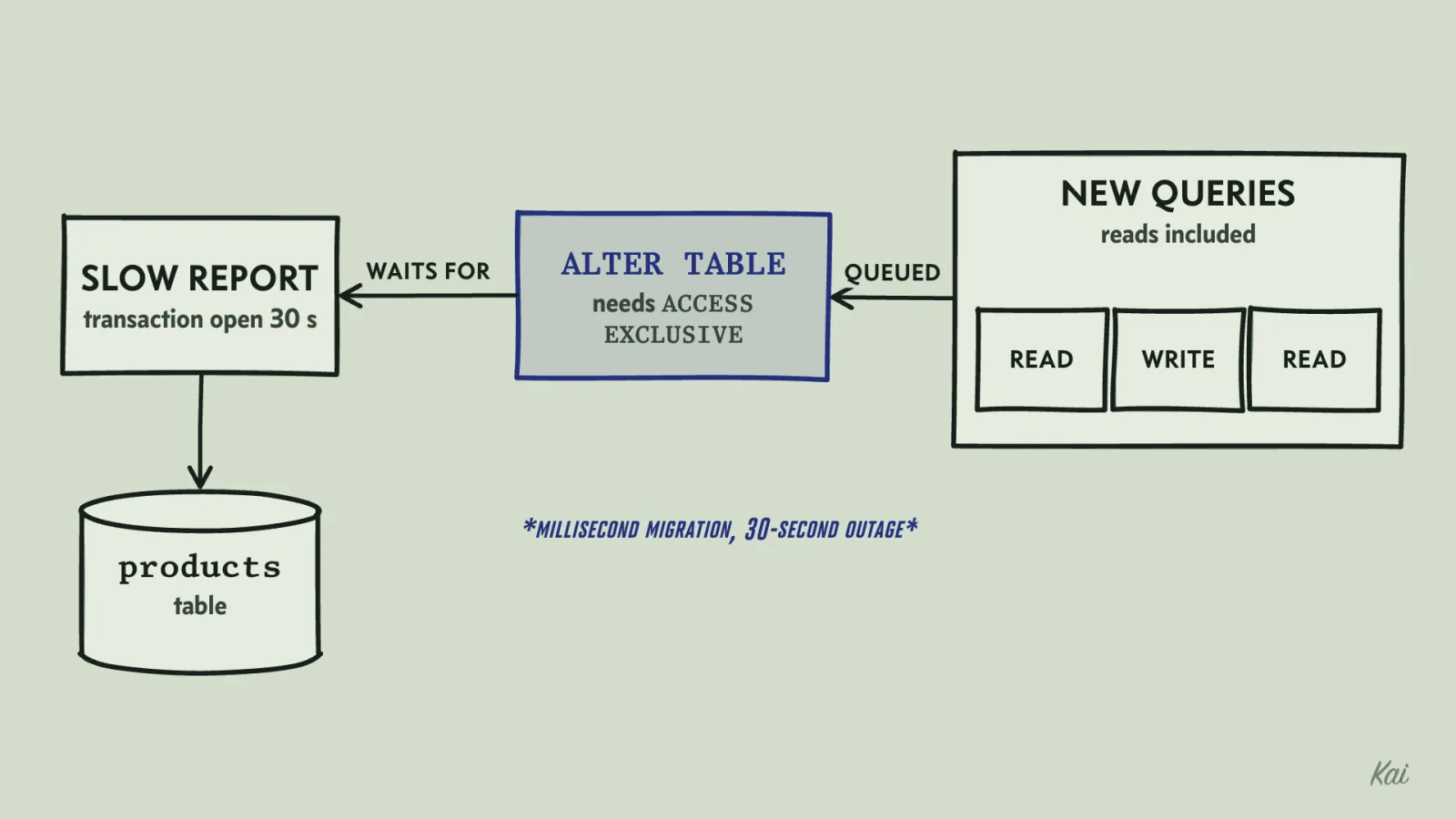
ALTER TABLE cannot take its lock until the slow report's transaction finishes, and every new query on the table, reads included, queues behind the ALTER. A millisecond migration becomes a 30-second outage.Even a fast statement can stall a table. To take its lock, the ALTER must wait for every transaction already using the table to finish. While it waits, every new query on that table queues behind it.
One slow report holding a transaction open for 30 seconds turns a millisecond migration into a 30-second outage. The defense is to set a short lock timeout in the migration, so it gives up and can be retried instead of blocking everyone:
SET lock_timeout = '2s';
ALTER TABLE products ADD COLUMN price_cents integer;
When you review a migration, ask of every statement what lock it takes and how much work it does while holding it. The PostgreSQL ALTER TABLE documentation lists the lock level for each form; other databases have their own rules.
Expand, migrate, contract
The fix for both problems is to split one incompatible change into several compatible ones, each deployed on its own. The pattern is usually called expand and contract, or parallel change. You first expand the schema so it supports both the old and the new shape, then move the code and the data across, then contract by removing the old shape once nothing uses it.
For the cents change, the sequence looks like this. Each step is a separate deploy, and each one finishes rolling out before the next begins.
- Add
price_centsas a nullable column. Nothing reads or writes it yet, so old code is unaffected. - Deploy code that writes both columns on every insert and update, and still reads
price. - Backfill existing rows in small batches, outside any long transaction.
- Deploy code that reads
price_cents. It still writes both columns. - Deploy code that writes only
price_cents. Ifpriceis declaredNOT NULL, drop that constraint first, or inserts that leave it out will fail. - Once no running code touches
price, add theNOT NULLconstraint and dropprice.
The backfill in step 3 walks the table one range of ids at a time, so each transaction holds its row locks briefly:
UPDATE products
SET price_cents = round(price * 100)
WHERE id >= $1 AND id < $1 + 5000;
A script runs that statement for each range up to the highest id, pausing between batches if the database is busy. It rewrites every row, including rows that already have a value. That matters because during step 2's rollout a new instance could write both columns and an old instance could then update only price, leaving the two out of step. Once step 2 is fully live, every writer keeps both columns in step, so one full pass after that point leaves the table consistent.
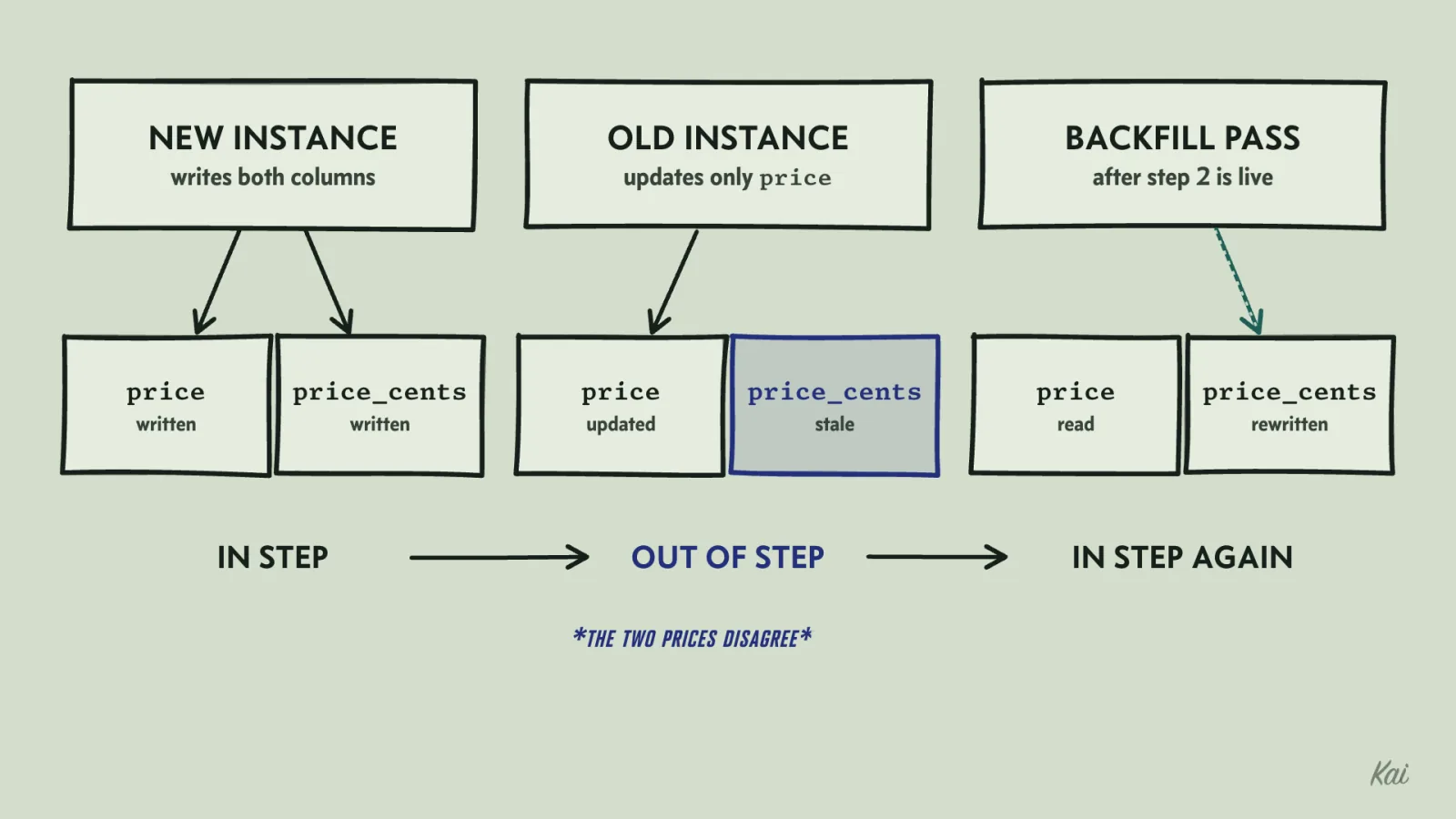
price, so the row's two prices disagree. A backfill pass that starts after step 2 is fully live rewrites every row and leaves the table consistent.Check each step against the rule from the first section. During the rollout of step 2, old instances write only price and new ones write both, and the schema accepts both.
During step 4, some instances read price and some read price_cents, and both columns hold the same values because every writer still writes both. The column is only dropped after the code that read it is gone from every instance. A plain rename follows the same steps, with a copy in place of the conversion.
For the NOT NULL constraint on a large table, Postgres lets you avoid holding the heavy lock during the scan: add a CHECK (price_cents IS NOT NULL) NOT VALID constraint, run VALIDATE CONSTRAINT separately (it takes a lighter lock), and since Postgres 12, SET NOT NULL can then skip its own scan by using that validated check.
This takes six deploys instead of one, which is practical only when a deploy is cheap and automated.
What a rollback leaves behind
A rollback redeploys the previous version of the code. Migrations and every other piece of external state stay exactly as the bad release left them.
Try it on the agent's original migration. The new code has a bug, so you roll back. The old code starts, queries price, and finds no such column. The rollback has made things worse, because the only version that works with the current schema is the one you just removed.
You could write a down migration that re-adds price and recomputes it from price_cents. That works here only if every stored price is an exact number of cents and fits in the integer range:
CREATE TABLE products (id integer PRIMARY KEY, name text, price numeric);
INSERT INTO products VALUES (1, 'Mug', 12.50), (2, 'Poster', 19.999), (3, 'Sticker', 0.10);

-- The agent's conversion (the DROP comes after it).
ALTER TABLE products ADD COLUMN price_cents integer;
UPDATE products SET price_cents = round(price * 100);

-- A down migration would rebuild price from price_cents.
SELECT name, price AS original, price_cents, price_cents / 100.0 AS rebuilt,
       price = price_cents / 100.0 AS matches
FROM products;
Output
The poster's 19.999 comes back as 20. If a dropped column held values that existed nowhere else, no down migration can bring them back.
The expand-and-contract sequence fixes most of this as a side effect. Through step 4, the previous step's code still works against the current schema, so you can roll back one step at a time. Step 5 breaks that: once the code stops writing price, the column goes stale, and a version that reads price would serve old prices. Keep the dual writes until you would no longer restore such a version. If you must restore one anyway, repair price from price_cents and verify it first. The final drop cannot be rolled back, and by then the code that needed the column has been gone for days.
Data is one kind of state a rollback leaves behind. Before you trust a rollback, list the others the release could have changed:
- Feature flags live in a flag service or a config table, and redeploying code does not reset them.
- Cache entries written by the new code stay in the cache, in whatever format the new code used, until they expire.
- Jobs and messages the new code enqueued are still waiting to be processed, possibly by the old code.
- Emails, webhooks and charges already sent to the outside world stay sent.
Feature flags are also a tool for making rollback cheaper. If step 4's read path sits behind a flag, you can deploy the code with the flag off, turn it on for a small fraction of users, and turn it off in seconds if something is wrong, without a deploy. This separates deploying code from releasing behavior. Every flag you add is also a branch in your code that has to be tested both ways and deleted when the rollout is done.
Canary deploys limit exposure at the instance level instead, sending a few percent of traffic to the new version first and watching its error rate before sending the rest.
Sometimes rollback is the wrong move. If the release included an irreversible migration, or the bug is small and the fix is one line, rolling forward with a new release can be safer than going back. Decide which one you would use before you ship.
Split the change so someone can review it
The migration is only one problem with the pull request. It also renames a class, moves six files, and changes how discounts round, all in one diff. A reviewer reading forty files of renames will not notice that one line in the discount code went from Math.floor to Math.round. That line changes what customers pay.
A refactor should change structure and leave behavior alone. Mixed with a behavior change, neither can be verified: the reviewer cannot confirm the refactor is behavior-neutral, and cannot find the behavior change in the noise.
Ask the agent to split the work into commits that each do one kind of thing:
- Rename
ProductRepotoProductStoreand move the files. No other edits. The existing tests pass unchanged. - Add
price_centsand dual writes. - Change discount rounding, with a test that shows the new result.
Each commit should build and pass tests on its own. The first can be reviewed by asking a single question: did anything other than names and paths change? The third is small enough to read line by line. If the rounding change turns out to be wrong, it can be reverted alone with git revert, without undoing the rename.
Two questions expose a mixed change. Could a reviewer confirm this commit changes no behavior, or name exactly the behavior it changes? If this commit were reverted by itself, what else would break? If the honest answer to the first is "not really," the commit needs splitting.
Configuration that lives only in production
The last way a change goes wrong has no diff at all. During an incident, someone raises the database pool size from 10 to 30 by editing an environment variable in the hosting console. The errors stop. Two weeks later a routine deploy applies the configuration from the repository, which still says 10, and the incident comes back with nobody remembering why it went away the first time.
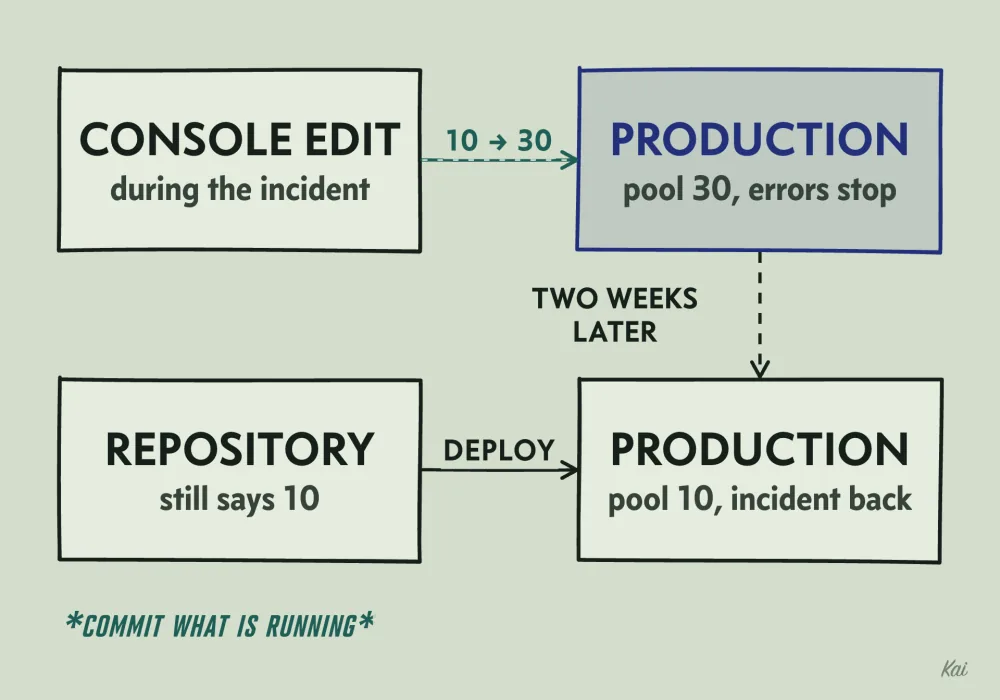
Any setting that exists only in a live system will be overwritten by the next change that rebuilds it from source. The fix is to keep configuration, and the infrastructure definitions around it, in version control and change them through the same review and deploy path as code. When an emergency forces a hand edit, the follow-up is a commit that makes the repository match what is running.
You can check for drift directly: terraform plan reports resources that differ from the code, and kubectl diff shows how the cluster differs from a manifest. The question behind both is whether you could rebuild this environment from the repository right now and get what is running today.
Before any release goes out, you should be able to say, for each change in it, what state it touches, whether old and new code can both run against that state at the same time, and what you would do to undo it.