
What the Schema Promises
You ask an agent to build class registration: students sign up for classes, pay a fee, and join a waitlist when a class is full. It hands you three tables, an invoice query and an admin page, and all of it works on your laptop.
CREATE TABLE students (
  id     serial PRIMARY KEY,
  name   text,
  email  text
);

CREATE TABLE classes (
  id         serial PRIMARY KEY,
  title      text,
  starts_at  timestamptz,
  fee        numeric,
  waitlist   jsonb          -- e.g. '["ana@example.com", "raj@example.com"]'
);

CREATE TABLE registrations (
  id             serial PRIMARY KEY,
  class_id       integer,
  student_id     integer,
  student_name   text,      -- copied from students
  student_email  text,      -- copied from students
  registered_at  timestamptz DEFAULT now()
);The test database has 12 classes and 300 registrations, and every test passes. A dataset that small hides two kinds of trouble: bad rows that nothing refused, and queries whose cost grows with the table. Both surface a year later, at 20 million registrations, with three other programs writing to the same tables.
A schema is two things at once. It is a promise about what the data can look like, which the database enforces on every write. It is also a physical layout that decides how much work every read costs.
A list in one column
Start with waitlist. It holds a JSON array of emails in the order people joined. PostgreSQL can index it, too: a GIN index on a jsonb column makes a containment query such as waitlist @> '["ana@example.com"]' fast; without one, that query reads every row.
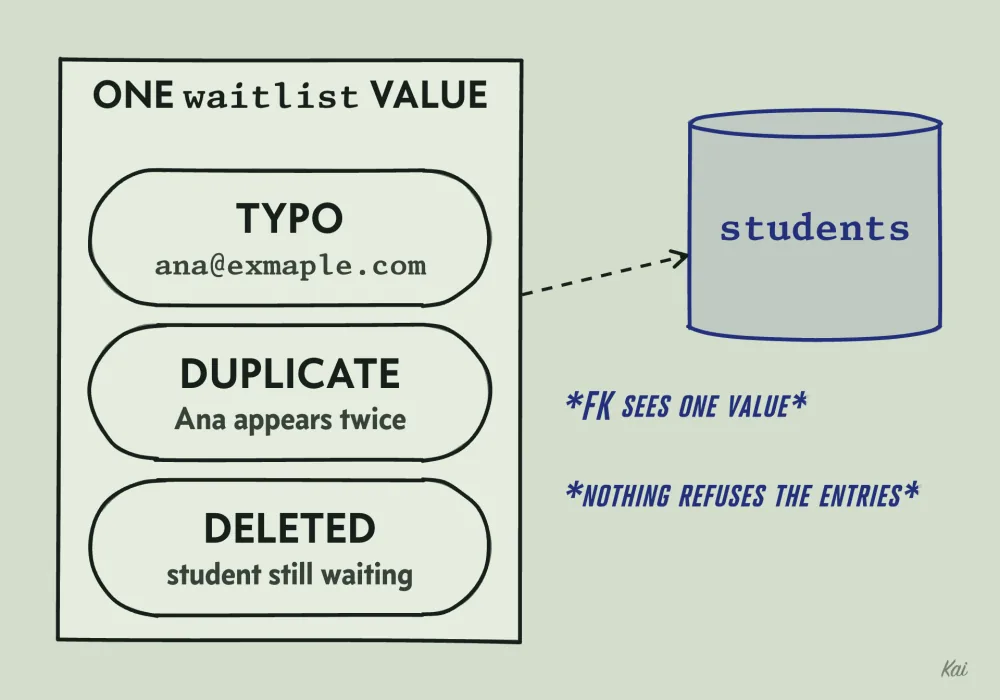
waitlist value, so a typo, a duplicate and a deleted student all get in.The trouble is what the database cannot check. Each email is supposed to belong to a real student, but a foreign key constrains a whole column value, and an array element is only part of one. A CHECK constraint can test the value's shape, but PostgreSQL supports checks only on the row being written. So a typo like ana@exmaple.com goes in, Ana can appear twice, and a deleted student stays on the waitlist.
The comma-separated version, 'ana@example.com,raj@example.com' in a text column, has the same gap and a speed problem too. The query an agent might try is WHERE waitlist LIKE '%ana@example.com%', which also matches diana@example.com. And a pattern that starts with % cannot use an ordinary B-tree index, which is sorted by the start of each value, so the database reads every row.
The question that exposes a list in a column: can the database guarantee that every item refers to something real and that no item appears twice? When it cannot, the list wants its own table, one row per item. In SQLite, with that fix after it:
CREATE TABLE classes (id integer PRIMARY KEY, title text, waitlist text);
INSERT INTO classes VALUES
  (17, 'Watercolor', 'raj@example.com,diana@example.com'),
  (18, 'Pottery',    'ana@example.com'),
  (19, 'Sketching',  'ana@example.com,ana@example.com');

-- Which classes is Ana waiting for?
SELECT id, title, waitlist FROM classes
WHERE waitlist LIKE '%ana@example.com%';

-- One row per item: each must name a real student, and the key allows one row per pair.
CREATE TABLE students (id integer PRIMARY KEY, email text NOT NULL UNIQUE);
CREATE TABLE registrations (
  student_id  integer NOT NULL REFERENCES students(id),
  class_id    integer NOT NULL REFERENCES classes(id),
  status      text NOT NULL,
  PRIMARY KEY (student_id, class_id)
);
INSERT INTO students VALUES (1, 'raj@example.com'), (2, 'diana@example.com'), (3, 'ana@example.com');
INSERT INTO registrations VALUES
  (1, 17, 'waitlisted'), (2, 17, 'waitlisted'), (3, 18, 'waitlisted'), (3, 19, 'waitlisted');

SELECT r.class_id FROM registrations r JOIN students s ON s.id = r.student_id
WHERE s.email = 'ana@example.com' AND r.status = 'waitlisted';
Output
One fact in one place
The same information, with each fact stored once:
CREATE TABLE students (
  id           bigint GENERATED ALWAYS AS IDENTITY PRIMARY KEY,
  family_name  text NOT NULL,
  given_name   text NOT NULL,
  email        text NOT NULL UNIQUE
);

CREATE TABLE classes (
  id         bigint GENERATED ALWAYS AS IDENTITY PRIMARY KEY,
  title      text NOT NULL,
  starts_at  timestamptz NOT NULL,
  fee        numeric(10,2) NOT NULL CHECK (fee >= 0),
  capacity   integer NOT NULL CHECK (capacity > 0)
);

CREATE TABLE registrations (
  student_id     bigint NOT NULL REFERENCES students(id),
  class_id       bigint NOT NULL REFERENCES classes(id),
  status         text NOT NULL CHECK (status IN ('enrolled', 'waitlisted', 'cancelled')),
  fee_charged    numeric(10,2) NOT NULL CHECK (fee_charged >= 0),
  registered_at  timestamptz NOT NULL DEFAULT now(),
  PRIMARY KEY (student_id, class_id)
);
"Ana is waiting for class 17" is now one row in registrations, and the waitlist order is registered_at. The primary key on the pair (student_id, class_id) makes it impossible to register the same student for the same class twice. The UNIQUE on email means at most one student row has any given email.
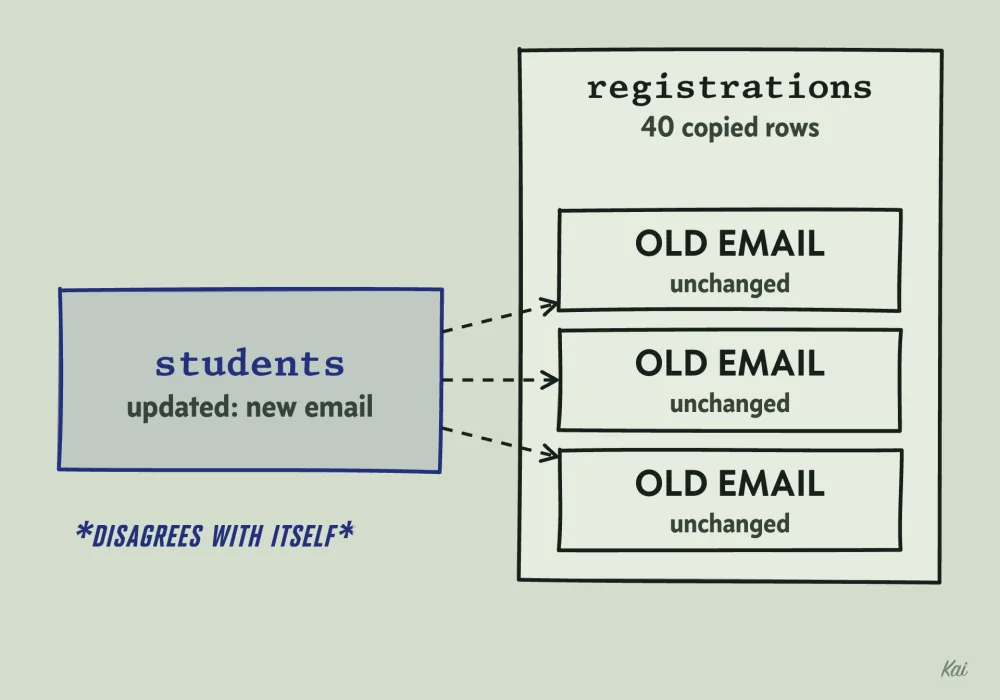
students row while 40 copied rows keep the old one, so the database contradicts itself.The agent's student_name and student_email were copies. When Ana changes her email, her students row changes and her 40 old registrations keep the old address, so the database now disagrees with itself. That is an update anomaly, and normalization is the practice of splitting tables until each fact lives in one place so it cannot happen.
First normal form says each column holds one value, which waitlist broke. Second normal form says a non-key column must depend on the whole key: in a table keyed by (student_id, class_id), a student's email depends on student_id alone, so it belongs in students. Third normal form says a non-key column must not depend on another non-key column: if classes held instructor_id and instructor_email, the email would depend on the instructor and belongs in an instructors table.
fee_charged looks like a copy of classes.fee and is a separate fact. The fee may rise next term, and Ana's invoice must show what she paid.
Rules the database checks on every write
In the agent's version, class_id and student_id are only numbers. The database will store a registration for student 99999, who does not exist, and keep registrations after their student is deleted. Application code may check, but it has bugs, and migrations, admin scripts and other services write to the same tables.
A constraint is a rule the database checks on every insert and update, from every writer. Most are checked as each statement runs; unique, primary key and foreign key constraints can be declared DEFERRABLE, which moves the check to commit.
PRIMARY KEYsays these columns identify the row, so together they must be unique and none may be null.REFERENCES(a foreign key) says the value must exist in the other table. It also guards deletes: by default, deleting a student who still has registrations fails.UNIQUEsays no two rows share this value.NOT NULLsays the value must be present.CHECKsays the row must satisfy an expression, such asfee >= 0.
NULL is where they leak. A nullable foreign key column accepts NULL, which points at nothing. UNIQUE, by default, allows any number of NULLs, since one NULL never equals another. A CHECK passes when its expression comes out NULL, so CHECK (fee >= 0) alone lets a missing fee through.
Add a foreign key to every column that holds another table's id, and NOT NULL wherever a missing value would be wrong.
A missing fee
Class 3 was created before anyone set its fee, and Ana, student 42, is registered for it:
CREATE TABLE classes (
  id   integer PRIMARY KEY,
  fee  numeric CHECK (fee >= 0)   -- NULL >= 0 is NULL, and a CHECK rejects only false
);
CREATE TABLE registrations (
  student_id  integer NOT NULL,
  class_id    integer NOT NULL REFERENCES classes(id),
  PRIMARY KEY (student_id, class_id)
);
INSERT INTO classes VALUES (1, 120.00), (3, NULL), (7, 80.00);
INSERT INTO registrations VALUES (42, 1), (42, 3), (42, 7);

SELECT c.id, c.fee
FROM registrations r JOIN classes c ON c.id = r.class_id
WHERE r.student_id = 42;

SELECT count(*) AS classes, count(c.fee) AS priced, sum(c.fee) AS billed
FROM registrations r JOIN classes c ON c.id = r.class_id
WHERE r.student_id = 42;
Output
sum skips NULLs, with no error and no warning. Ana is billed 200 for three classes, one never priced. If all three fees were NULL, sum would return NULL, which tends to become zero somewhere downstream.
The fixed schema declares fee numeric(10,2) NOT NULL CHECK (fee >= 0), which moves the failure to the moment someone creates a class without a fee, when a person can still fix it. Ask it of every column that feeds a total: what does this sum do when one value is missing?
Where to break the rules
Normalization optimizes for correct writes. The catalog page shows "14 of 20 seats taken" for every class, and you may choose to store enrolled_count integer NOT NULL DEFAULT 0 on classes so each page load skips counting registrations. That is a deliberate denormalization: a copy kept to make a read cheap, which can drift.
So the count changes in the same transaction as the registration, and it must stay correct when two students register at once. If the application reads 14, adds one and writes 15, two interleaved requests both write 15. An atomic update closes that gap:
BEGIN;
UPDATE classes
SET enrolled_count = enrolled_count + 1
WHERE id = 17 AND enrolled_count < capacity;
-- if 0 rows were updated, the class is full: roll back and waitlist instead
INSERT INTO registrations (student_id, class_id, status, fee_charged)
VALUES (42, 17, 'enrolled', 120.00);
COMMIT;
The UPDATE locks the class row, so a second registration waits, then re-checks enrolled_count < capacity against the new value. Cancellations decrement the same way, and a nightly recount catches any code path that forgot.
How a database finds a row
The agent's invoice query filters registrations on student_id, and no index covers that column. A foreign key would not add one: PostgreSQL requires an index on the key being referenced, and leaves the referencing column unindexed unless you create one.
Without an index, the only way to answer WHERE student_id = 42 is to read every row and test it, which is called a sequential scan. On 300 rows it takes microseconds. At 20 million registrations the table is on the order of a gigabyte, and every invoice reads all of it to find Ana's three rows.
An index is a second structure, kept sorted by some column, that points back to the rows. The usual kind is a B-tree. Picture the sorted values split into pages, with a page of signposts above them saying which page holds which range, and another page of signposts above that.
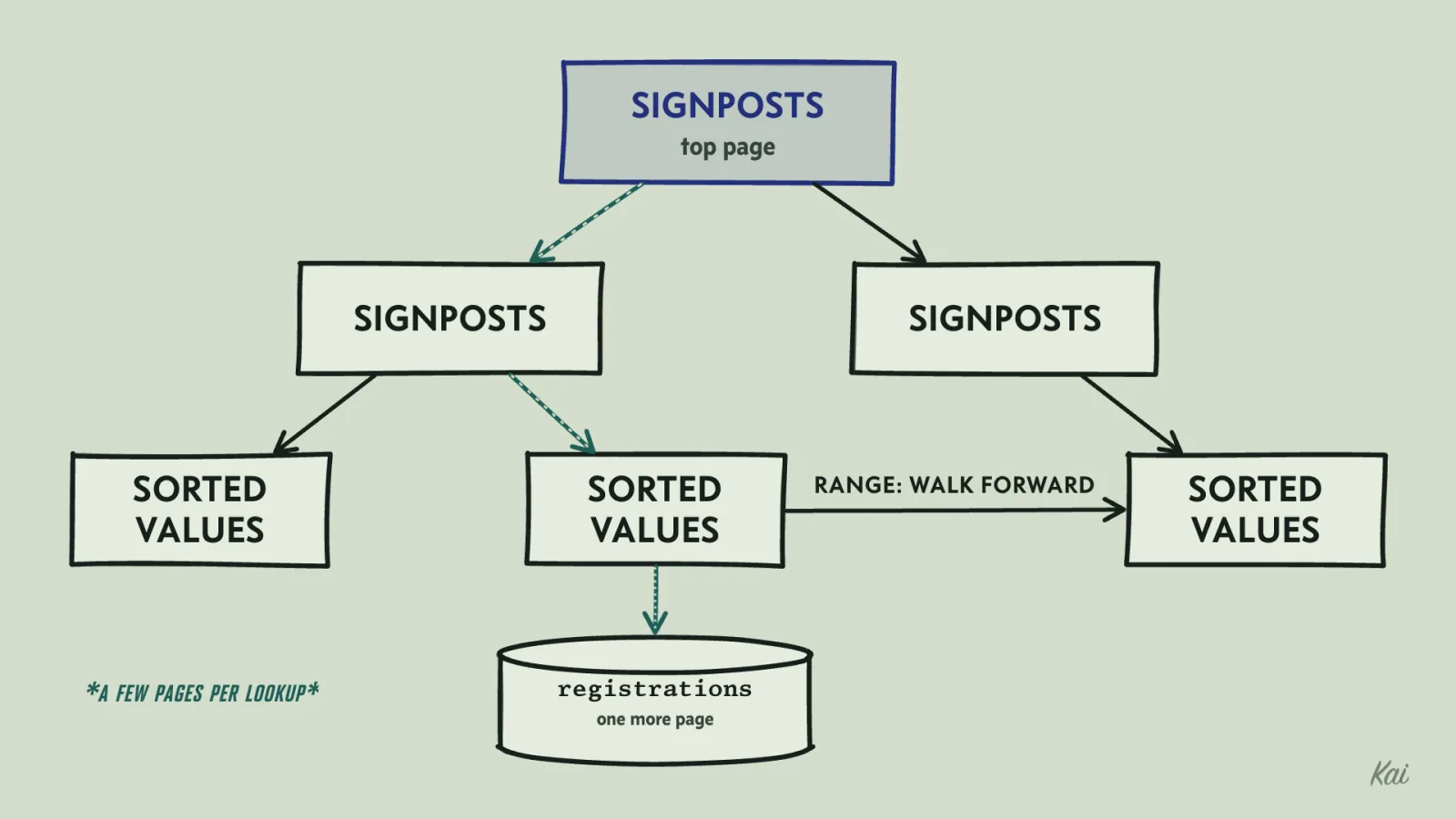
PostgreSQL pages are 8 KB, so one page of signposts holds a few hundred entries, and three or four levels cover tens of millions of rows. Finding one value means reading a few index pages, and fetching each matching row usually means one more page from the table. A range is found the same way, then read by walking forward along the bottom level.
Indexes cost something on writes. Every insert adds an entry to every index on the table, so a table with eight indexes maintains eight index entries per insert on top of the row, and updates can add entries too. Index what your queries filter, join and sort by, and stop there.
Reading the plan
EXPLAIN shows the plan the database would choose, without running the query. EXPLAIN ANALYZE runs it and adds what actually happened: real row counts and timings. Here is one plan you might see for the invoice lookup on the agent's full-size table; the exact shape depends on your data and settings.
EXPLAIN (COSTS OFF)
SELECT class_id FROM registrations WHERE student_id = 42;Gather
Workers Planned: 2
-> Parallel Seq Scan on registrations
Filter: (student_id = 42)Seq Scan with a Filter line means every row is read and tested. Gather and Parallel mean the read is split across worker processes, still covering the whole table. After CREATE INDEX registrations_student_id_idx ON registrations (student_id); a possible plan is:
Index Scan using registrations_student_id_idx on registrations
  Index Cond: (student_id = 42)
Index Cond means the index narrowed the search before any table row was read, and for a filter matching a few rows of a large table the planner will usually pick this. It may instead pick a Bitmap Index Scan feeding a Bitmap Heap Scan, which also uses the index. If the filter matches a large share of the table, it may keep the sequential scan, because reading everything in order is then cheaper than jumping around.
That is why a plan from a 300-row test database tells you nothing: the table fits in a few pages, and a sequential scan is correctly chosen.
A function around a column hides it from a plain index: WHERE lower(email) = 'ana@example.com' cannot use an index on email, which is sorted by the raw values. Index the expression or compare the bare column. And when estimated and actual row counts differ widely, check whether the table's statistics are current, for example by running ANALYZE, before trusting the plan.
Choosing column order in a composite index
The waitlist page asks who is next for class 17:
SELECT student_id FROM registrations
WHERE class_id = 17 AND status = 'waitlisted'
ORDER BY registered_at
LIMIT 1;
A composite index sorts by its first column, then by the second within ties, the way a phone book sorts by family name and then given name. You can find every Nguyen quickly, and every Linh Nguyen quickly. Finding every Linh means reading most of the book. So the primary key index on (student_id, class_id) serves the invoice lookup and does little for this query.
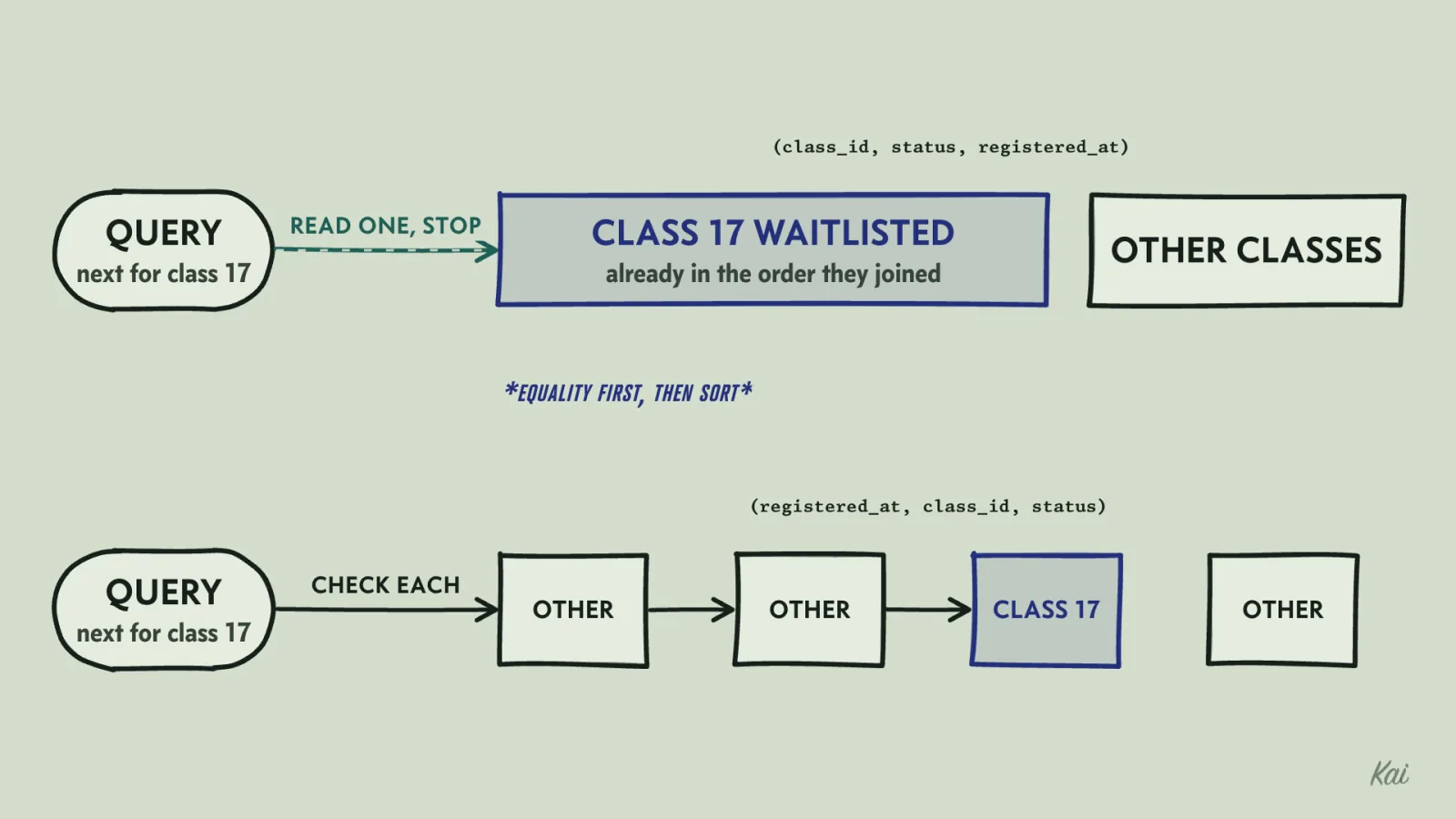
An index on (class_id, status, registered_at) puts class 17's waitlisted rows next to each other, already in the order they joined. The database goes to the start of that block, reads one entry, and stops. The rule: columns tested with equality first, then the column you sort by or filter by range.
Reverse it to (registered_at, class_id, status) and class 17's rows are scattered through the index by date. The database walks it in date order, checking each entry until one matches, which can mean reading much of the index. PostgreSQL 18 can sometimes skip through a leading column with few distinct values, and a timestamp has millions.
SQLite, which runs these playgrounds, prints shorter plans: SCAN walks a whole table or index, SEARCH means an index narrowed the rows, and USE TEMP B-TREE is a sort. Without statistics it assumes a table of about a million rows, so this one can stay empty.
CREATE TABLE registrations (
  student_id     integer NOT NULL,
  class_id       integer NOT NULL,
  status         text NOT NULL,
  registered_at  text NOT NULL,
  PRIMARY KEY (student_id, class_id)
);

-- 1. Only the primary key, which starts with student_id.
EXPLAIN QUERY PLAN
SELECT student_id FROM registrations
WHERE class_id = 17 AND status = 'waitlisted'
ORDER BY registered_at LIMIT 1;

-- 2. The timestamp first.
CREATE INDEX by_date ON registrations (registered_at, class_id, status);
EXPLAIN QUERY PLAN
SELECT student_id FROM registrations
WHERE class_id = 17 AND status = 'waitlisted'
ORDER BY registered_at LIMIT 1;

-- 3. Equality columns first, then the sort column.
DROP INDEX by_date;
CREATE INDEX by_class ON registrations (class_id, status, registered_at);
EXPLAIN QUERY PLAN
SELECT student_id FROM registrations
WHERE class_id = 17 AND status = 'waitlisted'
ORDER BY registered_at LIMIT 1;
Output
CREATE INDEX ON registrations (class_id, status, registered_at) INCLUDE (student_id) also holds the column the query returns, which makes an Index Only Scan possible. PostgreSQL may still visit the table for rows it cannot yet confirm are visible to every transaction; EXPLAIN ANALYZE counts those as Heap Fetches, and they fall after the table is vacuumed.
Why page 2,000 is slow
The admin page lists students alphabetically, 50 at a time:
SELECT id, family_name, given_name FROM students
ORDER BY family_name, id
LIMIT 50 OFFSET 100000;
The database cannot find row 100,000 without counting to it. With an index on (family_name, id) supplying the order, it steps through 100,050 rows and throws away the first 100,000. Without that index it reads and sorts every row. Page 1 reads 50 entries and page 2,001 reads 100,050, and crawlers and export scripts do walk every page.
Keyset pagination remembers the last row of the previous page and asks for the rows after it:
SELECT id, family_name, given_name FROM students
WHERE (family_name, id) > ('Nguyen', 48213)
ORDER BY family_name, id
LIMIT 50;
With the index on (family_name, id), the database seeks straight there and reads 50 entries on any page. The id breaks ties between students who share a family name, so no row is skipped or repeated at a page boundary. Every page must use the same ORDER BY, and family_name must be NOT NULL, because a row comparison involving NULL is never true and those students would drop out of the listing. The cost is that users cannot jump straight to page 2,000, which an admin list rarely needs.
Picking the store
A relational database is the right default for most application data: it enforces these rules and answers questions you did not plan for. Other stores fit narrow, known access patterns.
A key-value store fits data read and written by a single key, like login sessions. A document store fits records always read and written whole. A search engine fits ranked full-text search over prose, like class descriptions mentioning watercolor; exact membership, like who is on a waitlist, goes through the relationship table. A time-series store fits measurements appended and read back by time range.
For each query, work out how many rows it touches as the table grows. An equality lookup through an index reads a few pages whether the table holds a thousand rows or a hundred million, while a sequential scan, a leading-wildcard LIKE or a deep OFFSET does work in proportion to the table. Indexed lookups still depend on cache and load, so confirm the prediction with realistic data volume and concurrent traffic.