
You ask an agent to let customers type a discount code at checkout. A minute later it replies "Done, all tests pass" and hands you a pull request: a TypeScript function, a test, the SQL that stores the codes, and the terminal output from running the test. The lessons in this course start from material like that and ask you to read it closely enough to say whether it is right.
You do not need to know every rule of TypeScript or SQL to do that. You need a method that works on code you have never seen, and enough of the notation to apply it. The method has four steps:
- Find the inputs: what the code is given, and where each value comes from.
- Pick one concrete value for each input and trace it through, line by line, writing down what each name holds.
- Predict the output before you run anything.
- Run it and compare. Where your prediction and the output differ, either the code or your reading is wrong, and both are worth knowing.
The function
Here is the file the agent changed.
import { findDiscount } from "./discounts";

type LineItem = { name: string; priceCents: number; quantity: number };

export async function checkout(items: LineItem[], code: string): Promise<number> {
  const kept = items.filter((item) => item.quantity > 0);
  const lineTotals = kept.map((item) => item.priceCents * item.quantity);
  let total = 0;
  for (const cents of lineTotals) {
    total = total + cents;
  }

  if (code !== "") {
    const discount = await findDiscount(code.toUpperCase());
    if (discount === undefined) {
      throw new Error(`Unknown discount code: ${code}`);
    }
    if (!discount.active) {
      throw new Error(`Code ${discount.code} is no longer active`);
    }
    total = total - discount.centsOff;
  }
  return total;
}
The first line brings in a function, findDiscount, from another file in the project; it looks a discount code up in the database.
The type line describes the shape of a value. A LineItem is an object, a bundle of named fields: a name that is text (string), a priceCents that is a number, and a quantity that is also a number. Prices are kept as whole cents, so 1299 means $12.99, because whole numbers add up exactly in a computer and fractions of a dollar often do not. In a type line, and after a parameter or variable name, what follows the colon is a type annotation: a label saying what kind of value goes there. Inside a value, such as { name: "Notebook", priceCents: 1299, quantity: 2 }, the colon pairs a field with its value instead; a type describes a shape and a value fills it. A | between two types means either one, so Discount | undefined is a discount or nothing. A checker reads them before the program runs; they never change what the code does.
Inputs and names
The line that begins export async function starts the function. Its name is checkout, and the parentheses list its inputs, called parameters: items, which is an array of LineItem (the [] means "a list of"), and code, a string. After the closing parenthesis comes the type of what the function gives back, Promise<number>. Ignore async and Promise for a moment; read it as "this returns a number, eventually." That answers step 1 of the method: the inputs are a list of cart lines and the code the customer typed.
const and let create names for values. A name made with const cannot be pointed at a different value for the rest of the function, though an array or object it holds can still be changed inside. A name made with let can be given a new value later, which is why total is a let: the loop adds to it, and the discount line near the end subtracts from it. When you see let, look for every line that reassigns it, because each one is a place the value can go wrong.
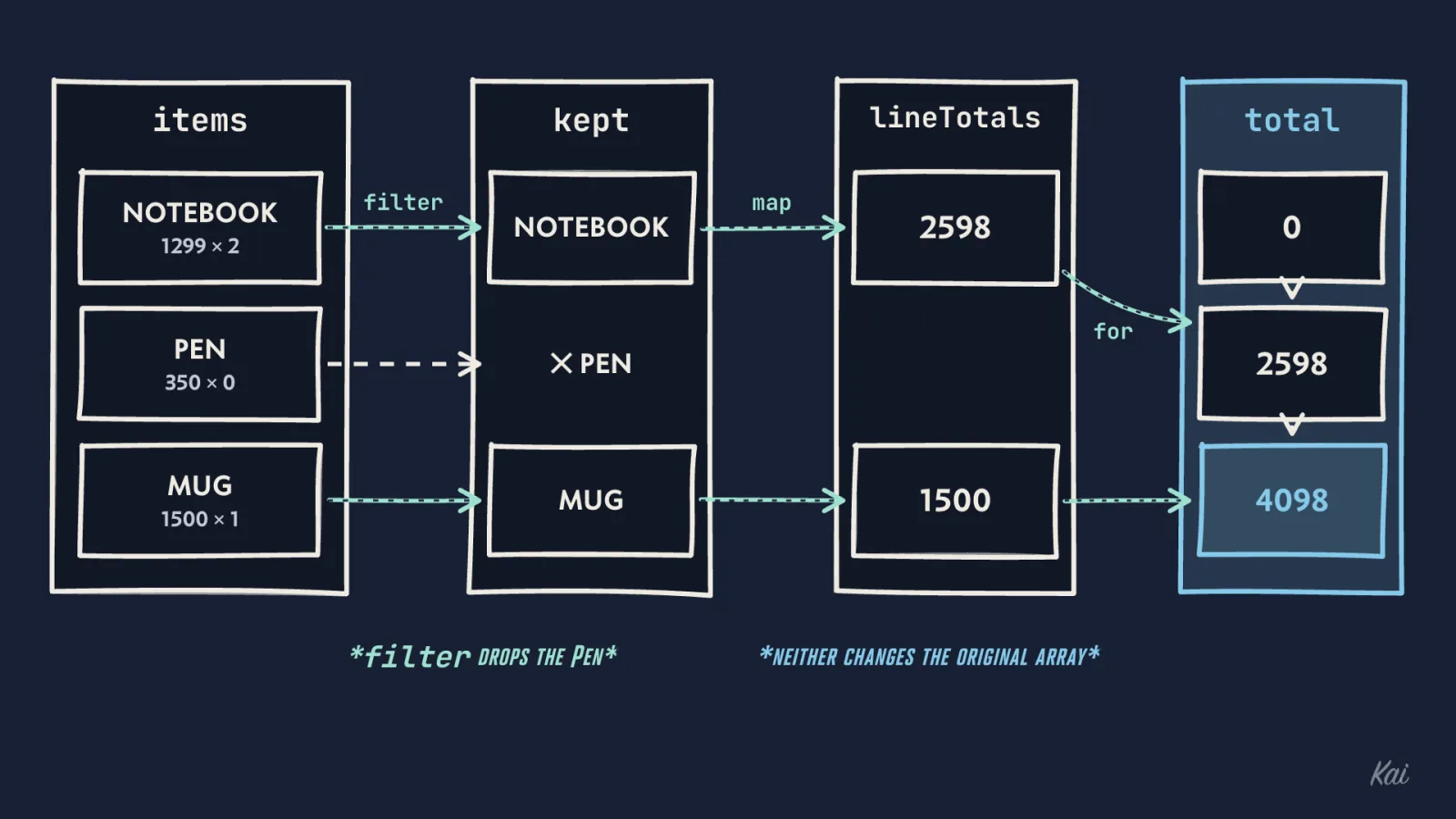
checkout: filter drops the Pen, map turns each kept line into price times quantity, and the loop adds those to total, which goes from 0 to 2598 to 4098.The filter and map lines use arrow functions, the (item) => ... pieces. An arrow function is a small function written inline. (item) => item.quantity > 0 takes one input, calls it item, and gives back whether its quantity is more than zero. Nothing runs until something calls it.
filter and map are what call it. items.filter(f) calls f once for each element of items and builds a new array of the elements for which f gave back true. So kept is the cart without the lines whose quantity is zero. kept.map(f) also calls f once per element, and builds a new array of whatever f gave back. So lineTotals is one number per kept line: price times quantity. Neither changes the original array. To read one element, write its position in square brackets; positions count from 0, so lineTotals[0] is the first and lineTotals[1] the second.
The three lines starting at for are a loop. for (const cents of lineTotals) runs the body once per element, with cents holding that element, and the body adds it to total.
Decisions and errors
if (code !== "") is a condition. if (...) { ... } runs the block in braces only when the condition is true. !== means "is not equal to," so the discount code is only looked up when the customer typed something. Its partner === means "is equal to," and it compares strictly: the number 1 and the string "1" are not equal. The double-equals form, ==, converts types before comparing and is rarely what you want.
The next line calls code.toUpperCase(), which gives back a copy of the text in capital letters, so "spring10" is looked up as "SPRING10". Hold on to that; it matters in the SQL.
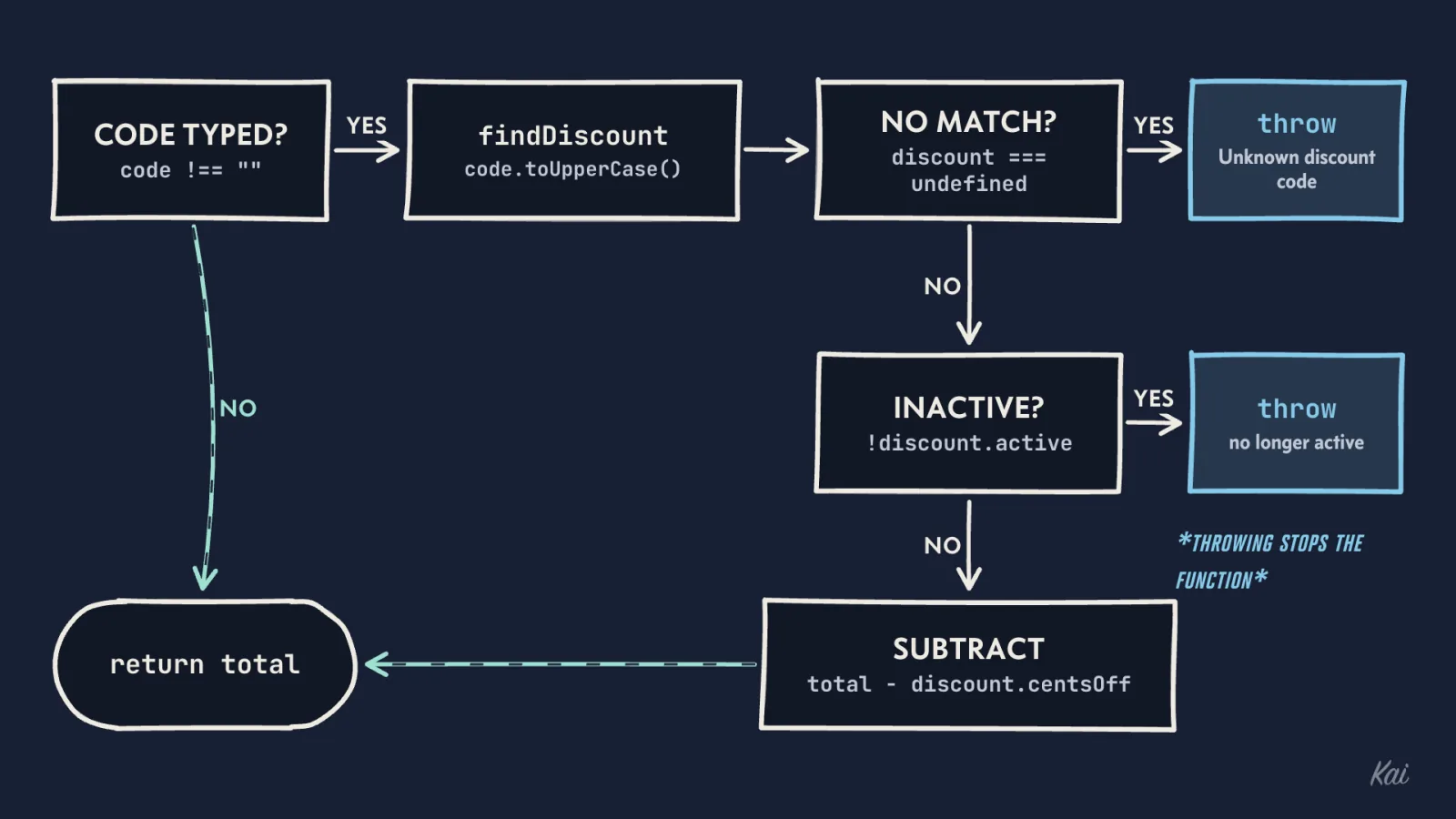
checkout has four ways out. With no code it returns the total untouched, an unknown or inactive code throws and stops the function there, and only a found, active code reaches the subtraction.The two if blocks after it handle two things that can go wrong. undefined is the value JavaScript uses for "nothing here," and findDiscount gives it back when no code matches. ! means "not," so !discount.active is true when the code exists but has been switched off. Its relatives are &&, "and," and ||, "or": a || b is true when either side is. In both cases the function throws an Error. Throwing stops the function immediately; no later line runs, nothing is returned, and the error travels up to whoever called checkout. That caller can catch it with try and catch.
The messages use template strings, written in backticks. Inside one, ${...} is replaced with the value of whatever is in the braces, so if the customer typed "BOGUS", the first throw builds the text "Unknown discount code: BOGUS".
total = total - discount.centsOff takes the discount off, and return total hands the total back.
Waiting: async and await
Looking up a code means asking a database, which might take a few milliseconds or a few hundred. A program that stood still while it waited would be unable to serve anyone else in that time. So a slow operation gives back a promise straight away: an object that stands for a value that is not ready yet. await pauses this one function until the promise has its value, then gives you the value. Other work carries on while it waits.
A function marked async can use await inside it, and it always returns a promise itself. That is why checkout returns Promise<number> and not number, and why whoever calls it must await it too. If they forget, they hold the promise instead of the number. TypeScript reports total > 0 on a promise as an error; plain JavaScript runs it and quietly gives false.
Trace one value, then run it
Now the method. Take this cart and the code "spring10":
- Notebook, 1299 cents, quantity 2
- Pen, 350 cents, quantity 0
- Mug, 1500 cents, quantity 1
Trace it. filter drops the Pen, so kept has the Notebook and the Mug. map gives lineTotals as 2598 and 1500. The loop takes total from 0 to 2598 to 4098. The code is not empty, so the lookup asks for "SPRING10", which exists, is active, and is worth 1000 cents. The subtraction sets total to 3098. Prediction: 4098 with no code, 3098 with "spring10".
Before you run the block below, predict its last line too: two pens, 700 cents, with a 1000-cent code. The block puts a stand-in for findDiscount at the top, an array of codes and a short pause, so it runs on its own.
type LineItem = { name: string; priceCents: number; quantity: number };
type Discount = { code: string; centsOff: number; active: boolean };

// A stand-in for the discount_codes table and the trip to the database.
const discounts: Discount[] = [
  { code: "SPRING10", centsOff: 1000, active: true },
  { code: "WINTER25", centsOff: 2500, active: false },
];
async function findDiscount(code: string): Promise<Discount | undefined> {
  await new Promise((resolve) => setTimeout(resolve, 20));
  return discounts.find((d) => d.code === code);
}

async function checkout(items: LineItem[], code: string): Promise<number> {
  const kept = items.filter((item) => item.quantity > 0);
  const lineTotals = kept.map((item) => item.priceCents * item.quantity);
  let total = 0;
  for (const cents of lineTotals) {
    total = total + cents;
  }

  if (code !== "") {
    const discount = await findDiscount(code.toUpperCase());
    if (discount === undefined) {
      throw new Error(`Unknown discount code: ${code}`);
    }
    if (!discount.active) {
      throw new Error(`Code ${discount.code} is no longer active`);
    }
    total = total - discount.centsOff;
  }
  return total;
}

const cart: LineItem[] = [
  { name: "Notebook", priceCents: 1299, quantity: 2 },
  { name: "Pen", priceCents: 350, quantity: 0 },
  { name: "Mug", priceCents: 1500, quantity: 1 },
];

console.log(await checkout(cart, ""));
console.log(await checkout(cart, "spring10"));

const notYet = checkout(cart, "");
console.log(notYet instanceof Promise, await notYet);

try {
  await checkout(cart, "WINTER25");
} catch (err) {
  console.log("checkout failed:", (err as Error).message);
}

const twoPens: LineItem[] = [{ name: "Pen", priceCents: 350, quantity: 2 }];
console.log(await checkout(twoPens, "SPRING10"));
Output
The first two lines match the trace: 4098 and 3098. The third line shows that checkout called without await gives back a promise (true), and that awaiting it gives the number. The fourth shows try and catch at work: the error thrown for the inactive code skipped the rest of checkout, landed in the catch block, and (err as Error).message read its text. as Error tells TypeScript to treat the caught value as an Error, since a throw can throw anything.
The last line is the one to compare with your prediction: -300. The customer would be owed three dollars for buying two pens. Nothing in the function stops the total at zero, and you found that by choosing a value at the edge, a cart cheaper than the discount. When you trace, pick one ordinary value and then one at a boundary: zero, empty, the smallest, the largest.
Tests and the shell
The agent's pull request came with one test. You add a second for the case you just found:
import { expect, test } from "bun:test";
import { checkout } from "./checkout";

test("a discount code takes money off", async () => {
  const cart = [{ name: "Notebook", priceCents: 1299, quantity: 2 }];
  expect(await checkout(cart, "SPRING10")).toBe(1598);
});

test("a discount never makes the total negative", async () => {
  const cart = [{ name: "Pen", priceCents: 350, quantity: 2 }];
  expect(await checkout(cart, "SPRING10")).toBe(0);
});
Each test has a name, written as a sentence about what should be true, and a function that checks it. expect(x).toBe(y) is the check: it passes when x is exactly y and fails otherwise.
Then you run the tests in a terminal:
$ bun test ./checkout.test.ts
bun test v1.3.6 (d530ed99)

checkout.test.ts:
 9 | test("a discount never makes the total negative", async () => {
10 |   const cart = [{ name: "Pen", priceCents: 350, quantity: 2 }];
11 |   expect(await checkout(cart, "SPRING10")).toBe(0);
                                                ^
error: expect(received).toBe(expected)

Expected: 0
Received: -300

      at <anonymous> (/home/you/shop/checkout.test.ts:11:44)
(fail) a discount never makes the total negative [22.23ms]

 1 pass
 1 fail
 2 expect() calls
Ran 2 tests across 1 file. [57.00ms]
The $ at the start of the first line is the prompt, the terminal's sign that it is waiting for you. You type what comes after it: the command bun test and the file to test. Every line after that is output. You never type the $.
To read a failure, find three things. The line of the test that failed, marked with ^ (the at line gives the same place as file, line and column). Expected, the value inside toBe(...), which is what the test author wanted. Received, the value inside expect(...), which is what the code actually produced. Here the code produced -300 where the test wanted 0, which is the bug you traced. The summary at the bottom says one test passed and one failed.
Reading a diff
You report the failure, and the agent sends a fix as a unified diff, the usual format for showing what changed in a file:
@@ -18,7 +18,7 @@ export async function checkout(items: LineItem[], code: string): Promise<number>
     if (!discount.active) {
       throw new Error(`Code ${discount.code} is no longer active`);
     }
-    total = total - discount.centsOff;
+    total = Math.max(0, total - discount.centsOff);
   }
   return total;
 }
The line starting @@ is the hunk header; a hunk is one changed region of the file. -18,7 means this region starts at line 18 of the old file and covers 7 lines; +18,7 says the same of the new file. The text after the second @@ names the function the change sits in. Below it, a line starting with - was removed, a line starting with + was added, and a line starting with a space is context: unchanged, shown so you can see where the change sits.
So the change is one line. Math.max(0, x) gives back whichever of its inputs is larger, so a negative total becomes 0 and any positive total is unchanged. Apply the method to the diff as well: trace the two pens through the new line, 700 minus 1000 is -300, the larger of 0 and -300 is 0, and the new test passes.
The SQL behind it
findDiscount reads from a database table, and placing an order writes to two tables. SQL is the language for asking a relational database for rows and for changing them. This block builds small SQLite tables and runs the shop's queries on them.
CREATE TABLE customers (id integer PRIMARY KEY, name text NOT NULL);
CREATE TABLE discount_codes (
  code        text PRIMARY KEY,
  cents_off   integer NOT NULL,
  active      integer NOT NULL,
  times_used  integer NOT NULL DEFAULT 0
);
CREATE TABLE orders (
  id             integer PRIMARY KEY,
  customer_id    integer NOT NULL REFERENCES customers(id),
  total_cents    integer NOT NULL,
  discount_code  text
);
INSERT INTO customers VALUES (1, 'Ana'), (2, 'Raj');
INSERT INTO discount_codes (code, cents_off, active) VALUES ('SPRING10', 1000, 1), ('WINTER25', 2500, 0);

-- What findDiscount asks for.
SELECT code, cents_off, active FROM discount_codes WHERE code = 'SPRING10';
SELECT count(*) AS rows_found FROM discount_codes WHERE code = 'spring10';

-- Placing an order: both changes happen, or neither does.
BEGIN;
INSERT INTO orders (customer_id, total_cents, discount_code) VALUES (1, 3098, 'SPRING10');
INSERT INTO orders (customer_id, total_cents, discount_code) VALUES (2, 4500, NULL);
UPDATE discount_codes SET times_used = times_used + 1 WHERE code = 'SPRING10';
COMMIT;
SELECT code, times_used FROM discount_codes;

-- Who used SPRING10?
SELECT customers.name, orders.total_cents
FROM orders JOIN customers ON customers.id = orders.customer_id
WHERE orders.discount_code = 'SPRING10';
Output
Read a SELECT in the order the database works through it. FROM discount_codes picks the table. WHERE code = 'SPRING10' keeps only the rows where that condition is true. SELECT code, cents_off, active picks which columns to show. The first query finds the one matching row. A WHERE can join conditions: with AND a row must meet both, with OR either one.
The second query is the same lookup in lower case, and it finds nothing: count(*) counts the rows that survive the WHERE, and here that is 0. In SQLite and PostgreSQL, = on text compares exactly, character by character, so capitals matter. That is why checkout called toUpperCase() before the lookup. A trace that crosses from TypeScript into SQL has to carry the exact value across.
INSERT INTO orders (...) VALUES (...) adds a row, naming the columns and then the values for them in the same order. UPDATE discount_codes SET times_used = times_used + 1 WHERE code = 'SPRING10' changes existing rows: for each row the WHERE keeps, it sets times_used to its old value plus one. An UPDATE without a WHERE changes every row in the table, so always look for one.
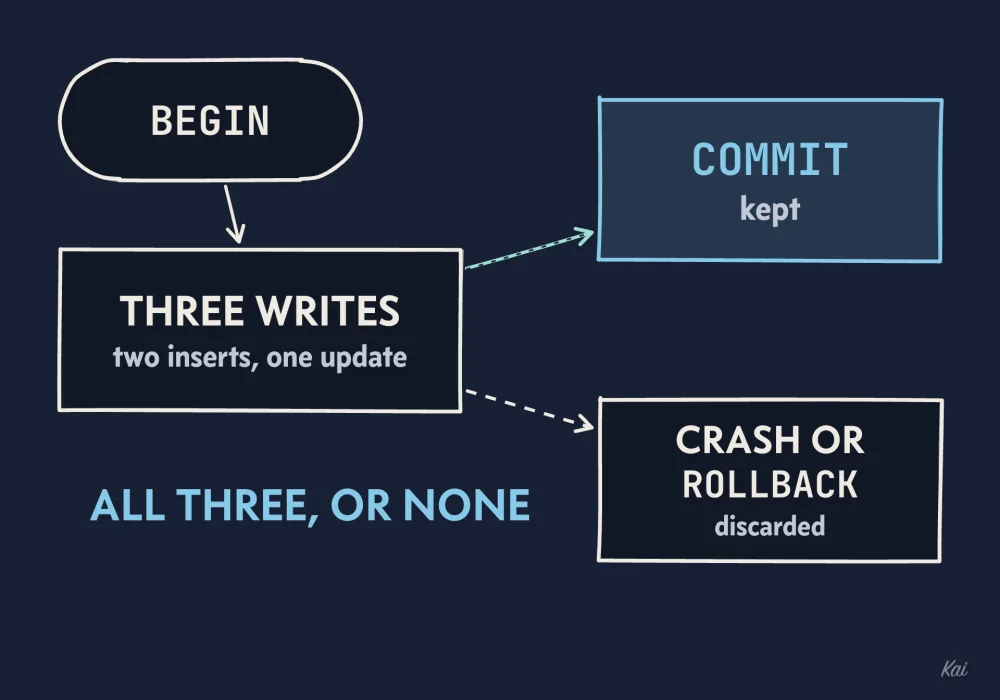
BEGIN and COMMIT the two inserts and the update are provisional. COMMIT keeps all three; a crash or ROLLBACK discards all three.BEGIN and COMMIT wrap those writes in a transaction. Until COMMIT, the changes are provisional. If the program crashes or calls ROLLBACK before then, the database discards all of them, so an order is never recorded without the code's count going up, or the other way round. The third result shows the count after COMMIT: SPRING10 used once, WINTER25 never.
The last query uses JOIN to combine two tables. For each order, ON customers.id = orders.customer_id finds the customer row whose id matches the order's customer_id, and the two are glued into one wider row, so you can show the customer's name beside the order's total. The WHERE then keeps only orders that used SPRING10, which is why Raj's order is missing from the result. A plain JOIN also drops any order whose customer_id matches no customer at all, which is worth remembering when a count comes out smaller than you expected.
Where to go next
If you are new to working with agents, read How Agents Work and How They Fail first. Otherwise start the course at Section 1, Intent, and trace the first piece of code it shows you before you read the paragraph that explains it.