
The course is a map of nine sections. Each section is split into subsections, and each subsection has one page with one lesson on it. You can read the pages in map order from the first to the last, follow a shorter core path through them, or go straight to the one area you need.
The nine sections
The course rests on one claim: when agents write the code, people still own six things, namely intent, verification, understanding, operation, security and direction. The sections teach them in that order.
- Intent teaches intent: deciding what you want precisely enough that done is defined before anything is built.
- Verification teaches verification: tests as the written definition of done, run on every change.
- The Machine teaches understanding: how source code turns into running behavior, down to memory and out across the network.
- Math and Algorithms teaches understanding: enough logic, complexity, statistics and estimation to check a claim yourself.
- State teaches understanding: how data is stored, shared and spread across machines, and what goes wrong when many things change it at once.
- Design teaches understanding: how a system is structured so it can keep changing without breaking.
- Operations teaches operation: debugging, observing and changing a system that is already running.
- Security teaches security: boundaries, sensitive data, and who may do what.
- Directing Agents teaches direction: how agents work and fail, how to hand them work, how to review what comes back, and what stays your responsibility.
Intent and verification come first because defining done and proving done are what the other sections keep returning to. Understanding takes four sections, because how code runs, the math under it, data and design are each a large subject. Understanding is what lets you see why a change is wrong instead of only that a test failed.
Each section page opens with its title and the course map, says why the area matters when agents do the typing, then lists its subsections. Every row gives the subsection's summary, one mistake it teaches you to catch, a link to its lesson with the reading time, and its depth. The section test sits at the end of the section page, after the last row.
The core path, depth and prerequisites
Some subsections are marked Core 1, Core 2 and so on, in reading order. Together they are the core path: the essentials, if you can only take part of the course. The path starts at Requirements and Acceptance Criteria, runs through every section, and ends in Directing Agents. Every core subsection builds only on earlier core subsections, so you can follow the path from Core 1 without stepping off it.
Every subsection also has a depth, which is how far a working developer needs to go in that area. There are three levels. Recognize means you can spot the problem when it appears in front of you. Explain means you can say why it happens, to a colleague or to yourself. Do means you can carry out the work: write the test, design the schema, run the investigation. Depth is drawn as a small scale of three steps, filled to the level.
A subsection can list prerequisites, the subsections it builds on. Those always come earlier in the map. If a lesson leans on an idea you have not met, its prerequisites are the first place to look.
What is on a lesson page
A lesson page in the nine sections has its parts in a fixed order, and each part has a job. The Introduction's own pages, this one included, are simpler.
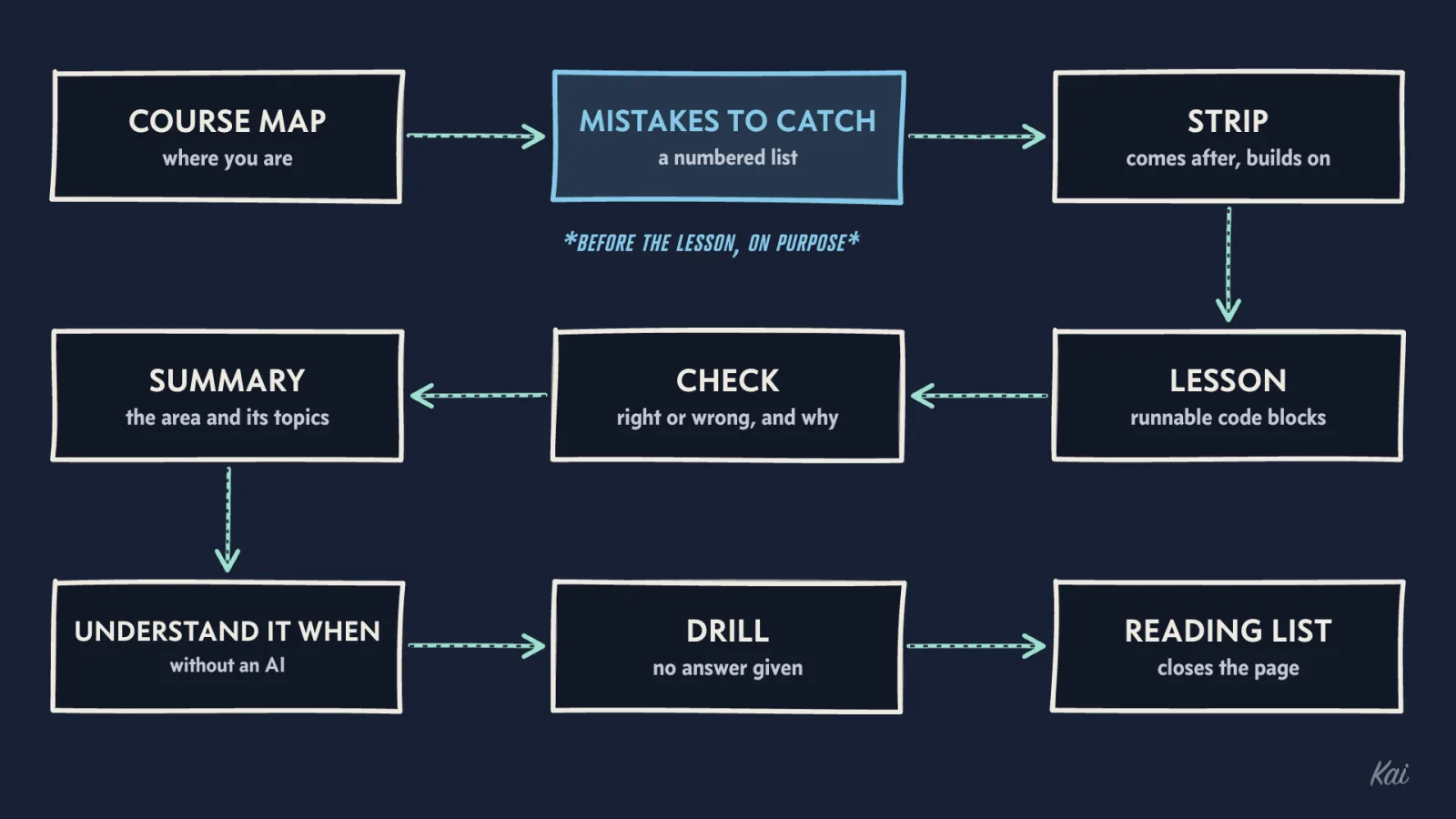
The course map comes first, under the title. It shows all nine sections in a row, with every subsection as a mark you can point at or follow; core-path marks are drawn differently, and the key under the map says how. On a lesson page the current subsection is highlighted, and a line under the marks joins it to the subsections it comes after, on its left, and the ones that build on it, on its right. It tells you where you are and what this area connects to.
Next are the mistakes to catch in review: a numbered list of specific errors agents make in this area. They come before the lesson on purpose. You read the lesson already knowing which mistakes it will teach you to find. Beside the list, a rail shows your position: the other subsections in this section, the depth, whether this subsection is on the core path, and links to the previous and next core steps when it is.
Under that, a strip links the subsections this one comes after and the ones that build on it. Use the left side when the lesson assumes something you lack, and the right side to see where the idea is used next.
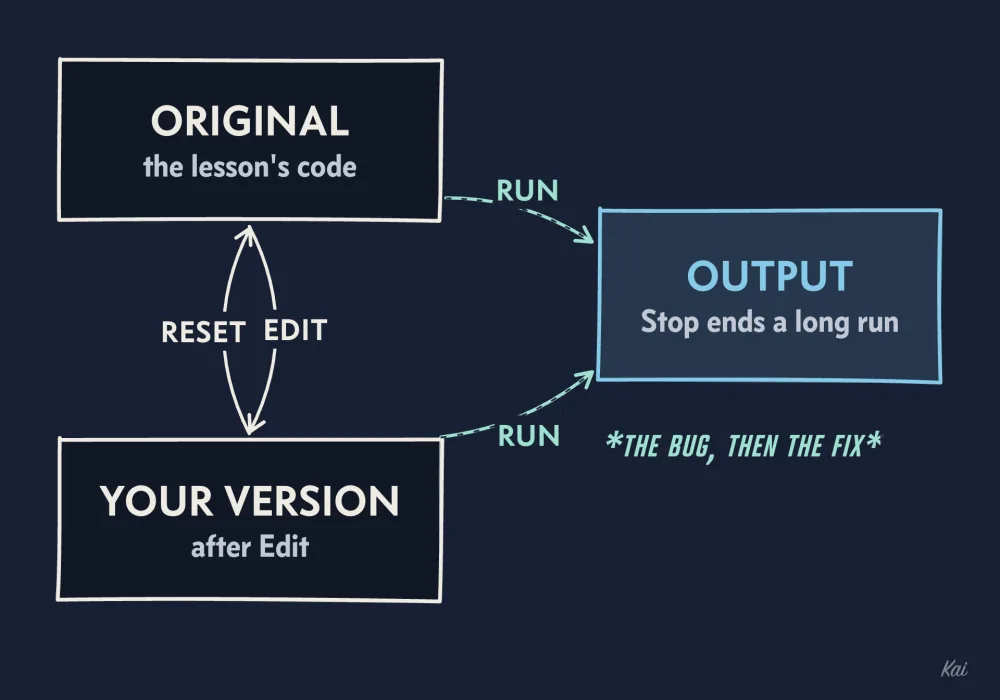
Then the lesson. It usually opens on something an agent just handed you and builds the idea from what the machine, the data or the people are actually doing. Code is highlighted, and every block has a Copy button. Some blocks are runnable, marked as running in your browser. You can press Run to see the output, Edit to change the code and run your version, Reset to put the original back, and Stop to end a run that is taking too long. A block is runnable because its output shows something, often the bug happening and then the fix behaving.
The check follows the lesson: a handful of questions, several of them built on code the lesson did not show. Pick an answer and the page tells you at once whether it was right and why, usually including why the tempting wrong answer is wrong. It keeps a running score, and you can clear your answers and try again.
After the check come a short summary of the area and its topics, each with a short description of what it covers. Then a short list under You understand it when you can: things you should be able to do without an AI once you have learned the area. Use it to test yourself after the check.
The drill comes next. It describes a flawed piece of agent output for you to work through. The page gives no answer, because working it out is the exercise.
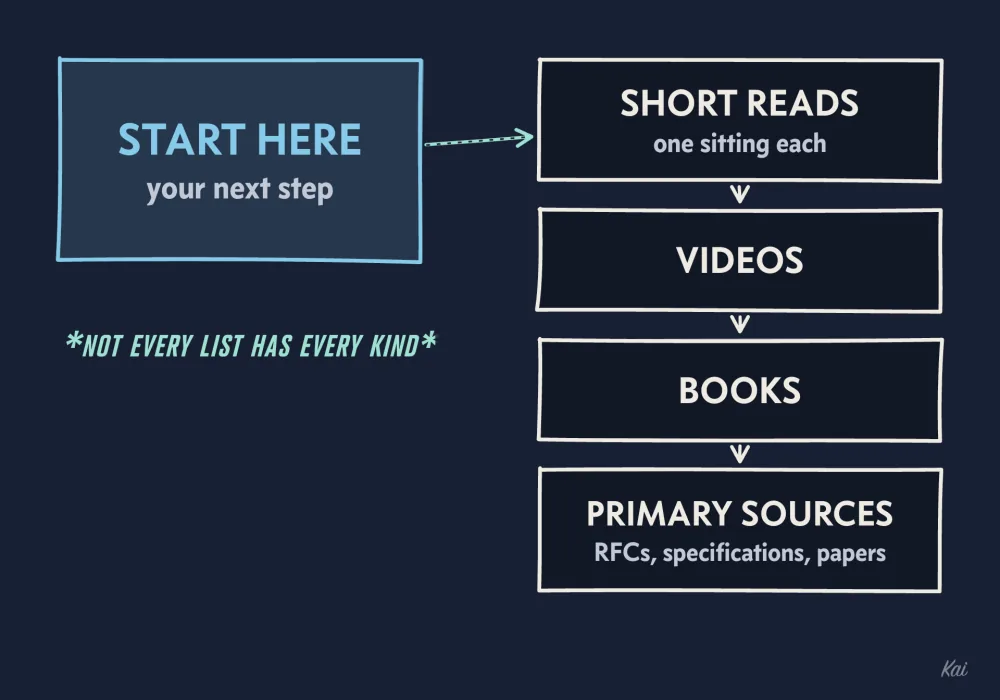
The reading list closes the page. One resource is set apart under Start here, picked as your next step if you want to go further. Short reads follow, each readable in one sitting, then videos, books, and primary sources such as RFCs, specifications, papers and official manuals. Not every list has every kind.
Which way in
Pick the route that matches your goal.
If you are new to working with agents, start with How Agents Work and How They Fail. It needs nothing else in the map, and it explains where agent mistakes come from, which makes every other lesson easier to place.
If you are short on time, follow the core path from Core 1 and use the Next on the core path link in the rail to move from step to step.
If you want the whole course, start at Section 1 and read in map order. The pager at the foot of each page takes you to the next subsection in the map.
If you are already strong in an area, go to that section's page and take its test before reading anything. Then read only the lessons behind the answers you missed. The explanation under each answer says which idea the question tests; match it to the subsection rows above the test to find the lesson that teaches it.
If reading TypeScript or SQL still slows you down, read Reading the code in this course first, then pick one of the routes above.
How to work a lesson
Before you press Run on a block, say what you expect it to print, then run it and compare. Then change something, a value or a condition, predict again and run again. Predicting before running is the habit the course is training.
Take the check as soon as you finish the lesson, before you move on. A question you get wrong usually points at the part of the lesson you skimmed, and the explanation tells you what you missed.
Do the drill on paper first. Then give your own agent a task of the same kind and review what it hands back the same way, looking for the mistakes listed at the top of the page.
What this site is and is not
Your check and test answers are saved only in this browser. Another browser or device will not see them, a private window forgets them when you close it, and clearing this site's data erases them. The whole site is free. There are no accounts, no certificates and no deadlines, and no one but you sees your score.
Every book, video and link in the reading lists was checked to exist, and the date of the last link check is in the footer of every page. The selections were made by an AI agent and have not yet been vetted by a human, so treat each one as a lead and keep it only if it teaches you something.